 CADO SCRIPT
Windows Settings
Important
It is mandatory to follow all steps on this page. Skipping any step may result in a delay ban & unsuccessful spoof, so please proceed carefully!
✅ INSTALL AIO RUNTIMES & DIRECTX
- 1
Download AIO Runtimes
- Download Visual C++ Redistributable Runtimes All-in-One Here
- Unzip the downloaded file.
- Right-click
install_all.batand select Run as administrator.
- 2
Download DirectX
- Download DirectX Here
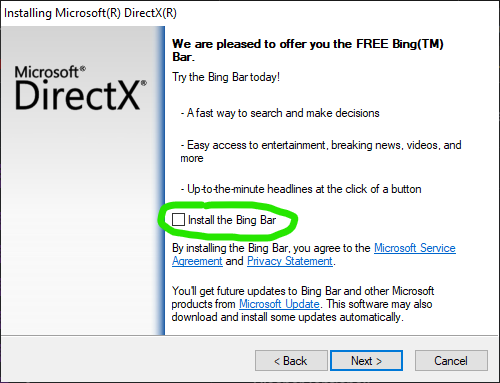
- Run the installer and follow the prompts to complete the installation.
- Make sure to uncheck "Install Bing Bar", that is not needed.
✅ DISABLE WINDOWS DEFENDER
- 1
Disable Windows Defender Manually 🔐 [REQUIRED]
- Type "Windows Security" on Windows Search Tab
- Select the Windows Security app from the search results, go to Virus & Threat Protection under Virus & Threat Protection settings select Manage settings
- Switch ALL protections to Off.

- 2
Defender Control Set to Disabled
- Download dControl Here (Password:
sordum) - Unzip the file.
- Run
dControl.exe. - Disable Windows Defender completely.
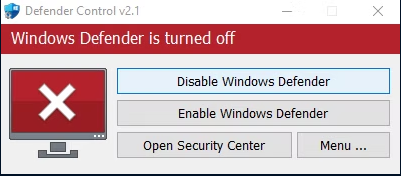
If you are having issues downloading DefenderControl it is because your Windows Defender is still active. Make sure you have no other Anti Virus active like Mcafee, AVG & Avast etc.
- Download dControl Here (Password:
✅ DISABLE WINDOWS UPDATES
- 1
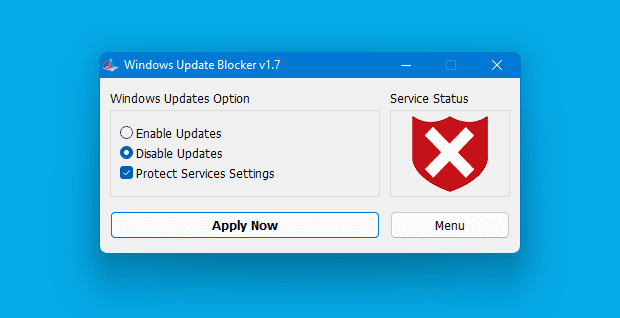
Windows Update Blocker
- Install Windows Update Blocker
- Run Windows Update Blocker
- Disable Updates and Click Apply.
✅ DISABLE UAC
- 1
Disable UAC
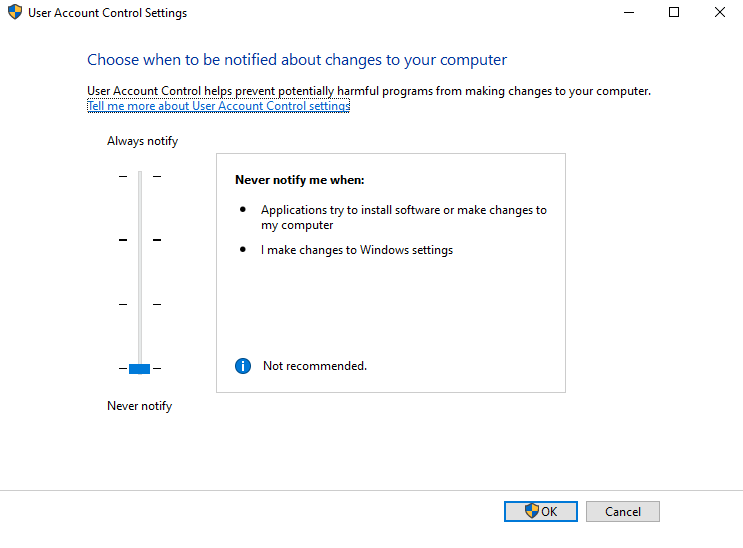
- Open Start, search UAC, and open Change User Account Control settings.
- Drag the slider down to Never notify.
- Click OK and confirm if prompted.
✅ ENABLE CORE ISOLATION
- 1
- Open Start, search Windows Security, and open it.
- Go to Device Security.
- Under Core Isolation, select Core Isolation Details.
- Make sure Memory Integrity is ON.
✅ Install Graphic Drivers
- 1
- Download the latest drivers for your graphics card (NVIDIA, AMD, or Intel) from the official website.
- Run the installer and complete the setup.
STUCK ON A STEP?
Open a ticket in our Discord and our team will help you immediately.